notation
Sheet music that lights up as it plays
notation is designed to bring the joy back into programming, for any age and any level: you give it a tune in one line and sheet music appears. You play the tune and each note lights as it sounds. You play along on a keyboard and it tells you how you did. It is notation.js for pictures.js and pynotation for Pyctures, with sound from synths and keys from dials.
Free and open source, MIT licence. Made for projects in Circuitry Studio; runs anywhere a browser does.
A song with its tune and bass written out
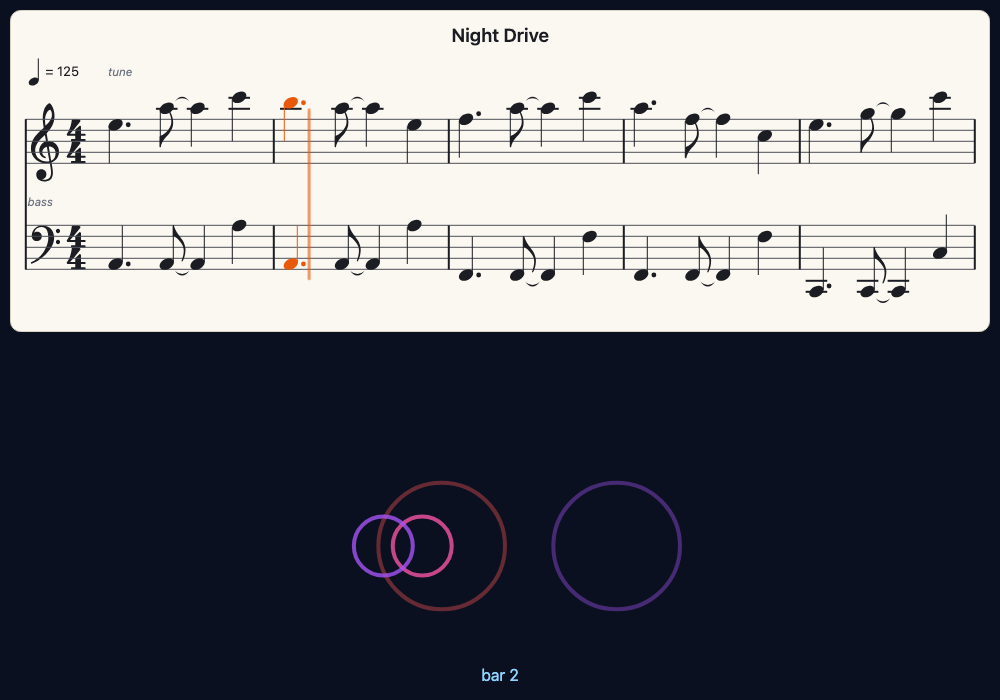
const song = await loadJSON("songs/night_drive.json")
const page = showNotes(song, { channels: [3, 1] })      // the tune and the bass, a staff each

function onMouseDown() {
  page.play()                                           // the page plays the song itself, and follows it
}

function draw() {
  background("#0b1020")
  text(page.bar ? "bar " + page.bar : "Click to start the song", width / 2, height - 24, "white", 18, "centre")
}
from pyctures import *
from pynotation import *

page = show_notes("songs/night_drive.json", channels=[3, 1])     # the tune and the bass, a staff each

def on_mouse_down(x, y):
    page.play()                                                  # the page plays the song itself, and follows it

def draw():
    background("#0b1020")
    words = "bar %d" % page.bar if page.bar else "Click to start the song"
    text(words, width / 2, height - 24, "white", 18, "centre")
A tune in one line
The notes are written the way playNotes takes them: a note is a letter and a number, - is a rest, :2 makes a note last two steps, and "quarter" says how long a step is. The key, the clef and the bars are worked out for you, on as many lines as the screen needs.
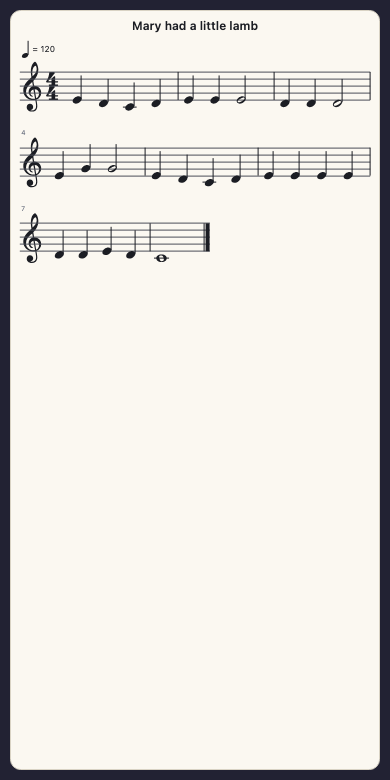
showNotes("E4 D4 C4 D4 E4 E4 E4:2", "quarter", { title: "Mary had a little lamb" })

function draw() {
  background("midnightblue")
}
from pyctures import *
from pynotation import *

show_notes("E4 D4 C4 D4 E4 E4 E4:2", "quarter", title="Mary had a little lamb")

def draw():
    background("midnightblue")
It draws clefs, keys, time signatures, notes and rests of every usual length, dots, ties, beams, chords, ledger lines, bar lines and bar numbers. What you can show.
Play it, and watch it go
page.play() plays the music and follows it: the notes that are sounding turn orange, a line moves through the bar, and the page turns when the music reaches the next line. page.onNote is called as each note begins, so a scene can do something on every note.
const page = showNotes("C4 C4 G4 G4 A4 A4 G4:2 F4 F4 E4 E4 D4 D4 C4:2", "quarter", { tempo: 100 })
page.onNote = (note) => console.log("now playing", note.name)

function onMouseDown() {
  page.play()
}

function draw() {
  background("midnightblue")
  text("Click here to play", width / 2, height - 30, "white", 18, "centre")
}
from pyctures import *
from synths import *
from pynotation import *

page = show_notes("C4 C4 G4 G4 A4 A4 G4:2 F4 F4 E4 E4 D4 D4 C4:2", "quarter", tempo=100)
page.on_note = lambda note: print("now playing", note.name)

def on_mouse_down(x, y):
    page.play()

def draw():
    background("midnightblue")
    text("Click here to play", width / 2, height - 30, "white", 18, "centre")
Time is never kept by the page. Where the music has got to is read every frame from the sound itself, so the notes that light are the notes you hear, however busy the scene is. Playing and following.
Music written as code
A sheet is written a note at a time, with loops and all. A sheet that is added to later is drawn again by itself.
const sheet = makeSheet({ key: "G", time: "3/4", tempo: 132, title: "Waltz" })
sheet.add("D4", "quarter")
sheet.add(["B4", "D5"], "half")          // a chord
sheet.rest("quarter")
for (const name of ["G4", "A4", "B4"]) sheet.add(name, "eighth")
showNotes(sheet)sheet = make_sheet(key="G", time="3/4", tempo=132, title="Waltz")
sheet.add("D4", "quarter")
sheet.add(["B4", "D5"], "half") # a chord
sheet.rest("quarter")
for name in ["G4", "A4", "B4"]:
sheet.add(name, "eighth")
show_notes(sheet)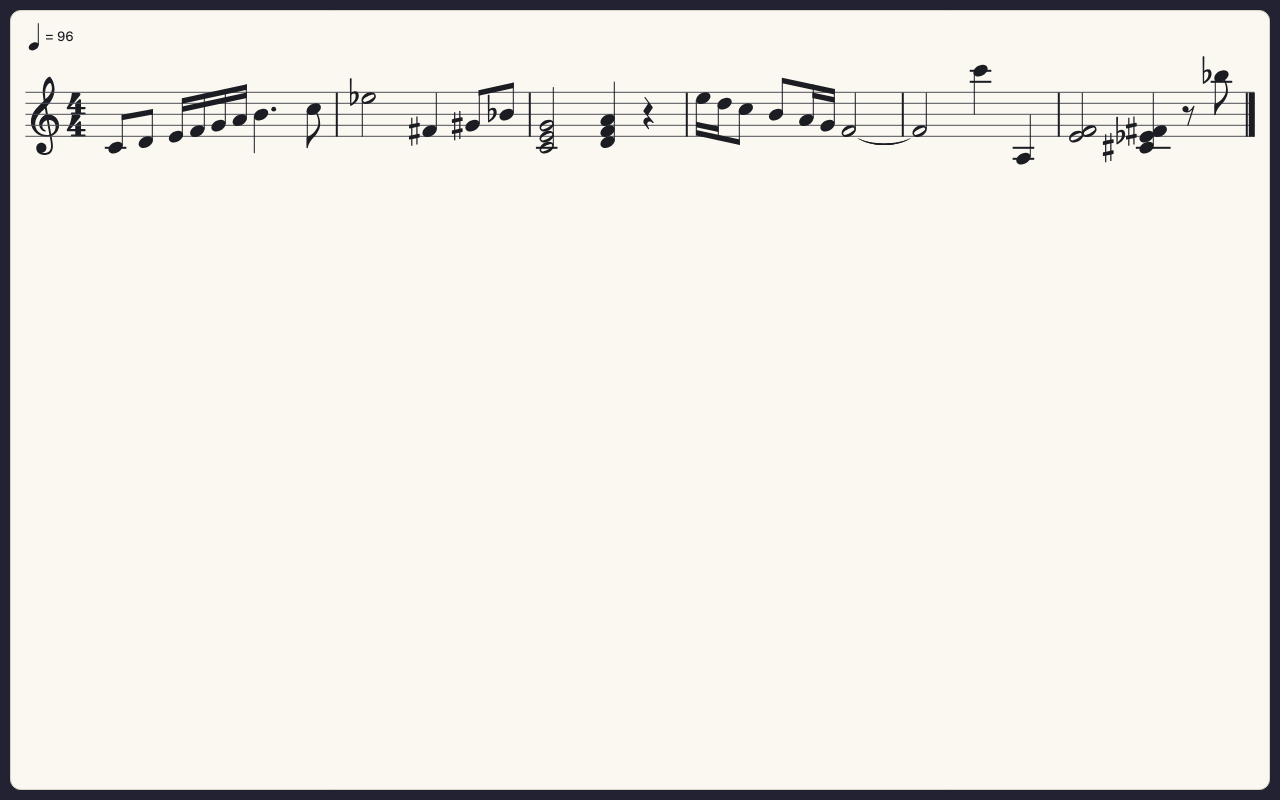
Play along
The line waits at each note until you play it, and the key to press is lit. A right note turns green; a wrong one shows in red for a moment where you played it. The keys are a dials keyboard given the page in place of a synth, and a real keyboard plays it too.
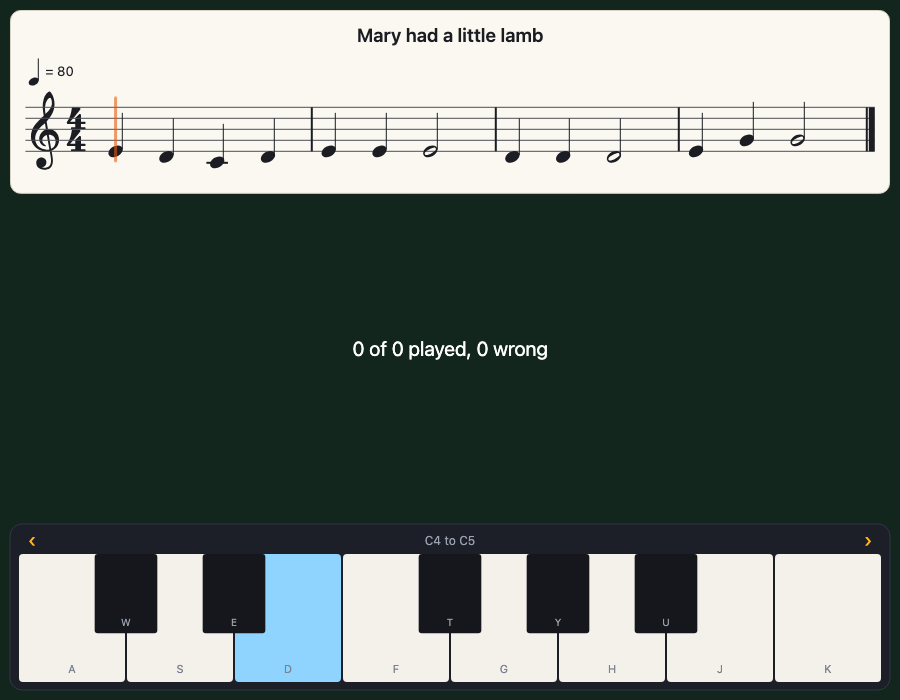
const lead = makeSynth("keys")
const page = showNotes("E4 D4 C4 D4 E4 E4 E4:2", "quarter")
page.playAlong({ mode: "wait", synth: lead })
keyboard(page, { octave: 4, octaves: 1 })        // a dials.js keyboard plays the page

function draw() {
  background("#12261e")
  text(`${page.result.right} right, ${page.result.wrong} wrong`, width / 2, height / 2, "white", 20, "centre")
}
from pyctures import *
from synths import *
from pydials import *
from pynotation import *

lead = make_synth("keys")
page = show_notes("E4 D4 C4 D4 E4 E4 E4:2", "quarter")
page.play_along("wait", synth=lead)
keyboard(page, octave=4, octaves=1)        # a pydials keyboard plays the page

def draw():
    background("#12261e")
    text("%d right, %d wrong" % (page.result.right, page.result.wrong), width / 2, height / 2, "white", 20, "centre")
page.playAlong("wait")                       // the line waits for each note
page.playAlong({ mode: "time", tempo: 60 })  // or keeps time, after one bar counted in

function onMidiNote(note, velocity) {        // a real keyboard plays the page
  if (velocity > 0) page.noteOn(note)
  else page.noteOff(note)
}page.play_along("wait") # the line waits for each note
page.play_along("time", tempo=60) # or keeps time, after one bar counted in
def on_midi_note(note, velocity, channel): # a real keyboard plays the page
if velocity > 0:
page.note_on(note)
else:
page.note_off(note)page.result counts the right, wrong and missed notes as the learner goes. Playing along.
A tracker song, written out
A tracker's grid is rows; written music is beats and bars. notation turns one into the other: rows become note lengths, tied and beamed by the beat, each channel gets the clef its notes sit best in, and drums get a percussion staff. You choose which channels to show. Tap a bar and the song jumps there. That is the picture at the top of this page. A song as sheet music says how, and where it guesses.
How to get it
In Circuitry Studio there is nothing to install. A JavaScript scene has showNotes and makeSheet ready, with nothing to import. A Python scene starts with from pyctures import * and from pynotation import *, which brings the sound with it. Both run in the preview beside your code.
Outside Circuitry, notation.js comes with pictures.js and pynotation comes with Pyctures: pictures run twinkle.js or pyctures run twinkle.py opens your browser on the scene. Neither is published on its own yet, to npm or to PyPI. Getting started says how to use them from a copy of their repositories, and has a page of your own with no pictures.js.