Code IDEA real IDE, with your coding agent living in it.

Point Circuitry at a folder on your Mac, PC or Linux box and it becomes an IDE around it — the real files, the file tree, source control, terminals — with Claude Code, Gemini CLI or Codex CLI running in the pane beside the code they are editing.

Part of Circuitry Studio — the same AI works in every surface, on the models you choose.
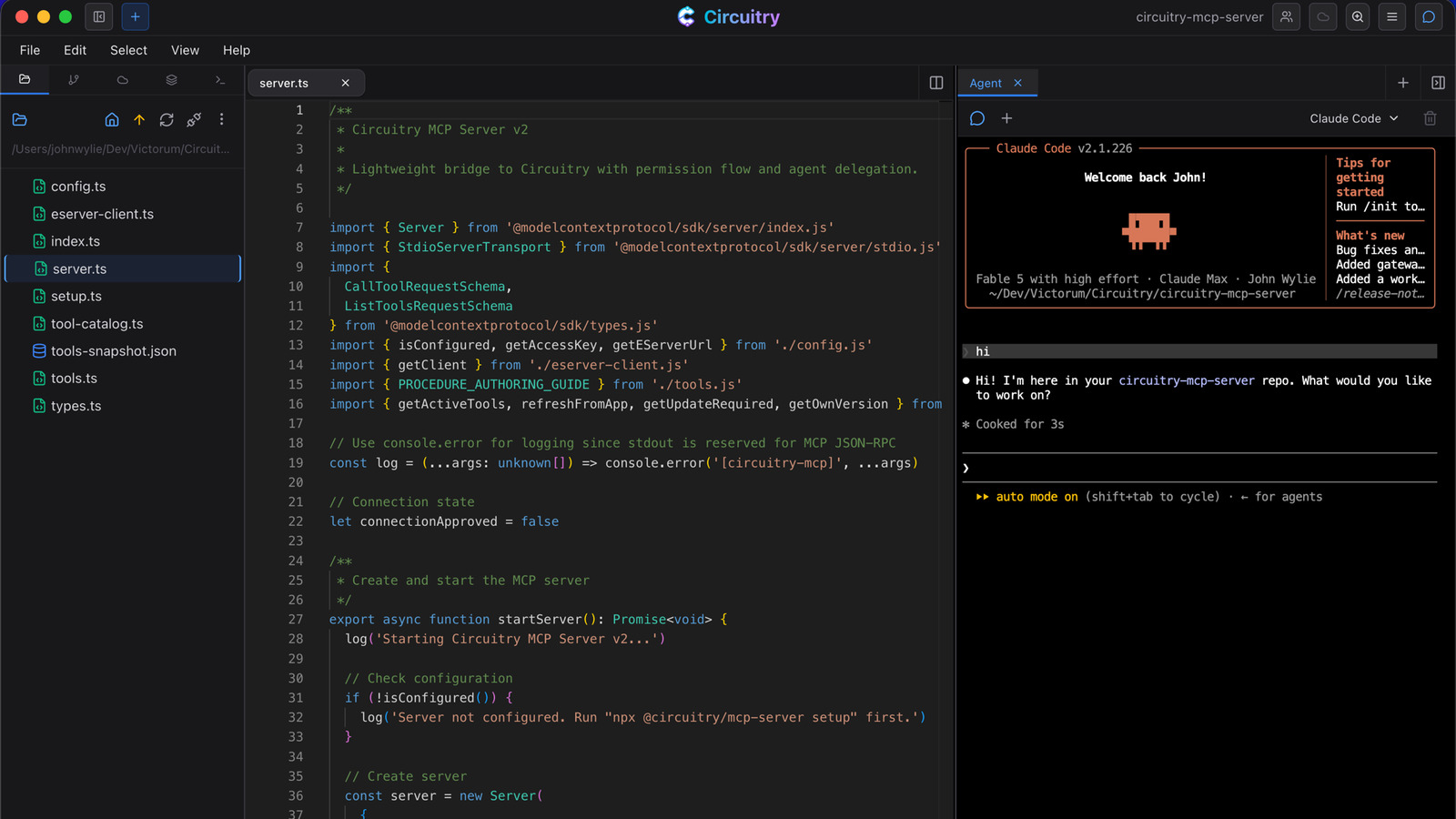
A coding agent working in the pane beside the code.

Open the folder. It is your project.

  • The left panel becomes the project tree — the actual directory on disk, with the files you already have open marked.
  • Every file opens as a tab in the editor that suits it: code, markdown, HTML, images, PDFs, data files.
  • A source-control panel tracks the working tree — changes, staging, commits, branches.
  • Terminals open in the same window, on the same machine as the files.
The Circuitry code IDE: project file tree on the left, a TypeScript file open in the centre, and Claude Code running in the agent pane on the right

One window: the project, the file, and the agent working on it.

Claude Code, Gemini CLI and Codex CLI run in the pane beside your code.

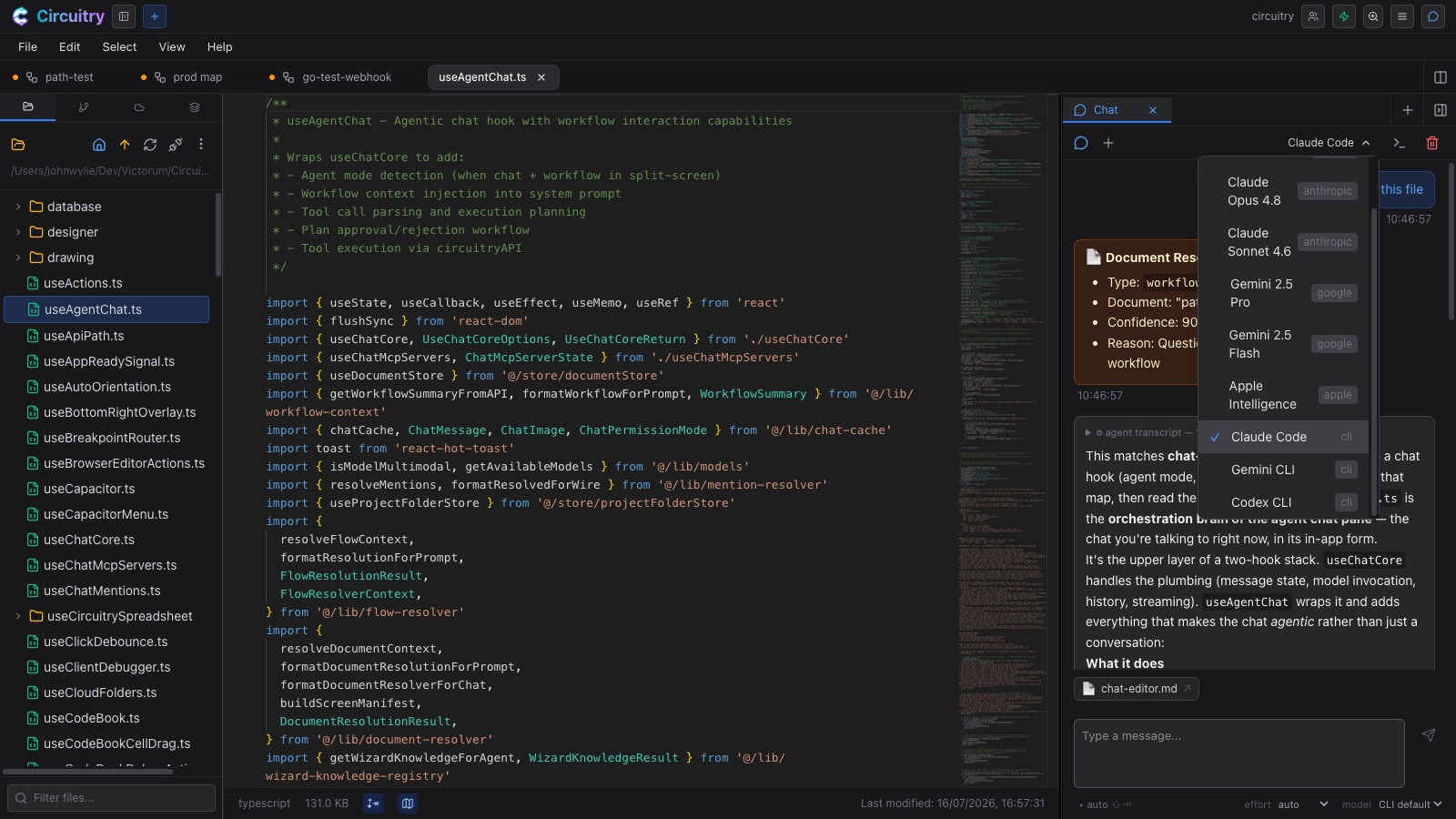
Pick one from the chat’s menu and it runs on the machine holding the project — your repositories, your toolchain, the CLI you already installed. The same menu holds hosted Claude, GPT and Gemini models, a local model on your own hardware, and Apple Intelligence in the app on recent Apple hardware. You can change model part-way through a conversation.

The agent chat's model menu open beside a TypeScript file, listing Claude, Gemini, Apple Intelligence and the Claude Code, Gemini CLI and Codex CLI command-line assistants

Hosted models, on-device models, and the command-line assistants, in one menu.

Select the code and say “this”.

The chat sees the document in the other pane, its path, and what you have selected, so you point instead of describing. It reaches the rest of the project the same way — ask it about the sketch you drew, a design, or a workflow, and it reads the shapes, layers and nodes and how they relate, not just a screenshot of them.

Shot needed
A code file with a block selected, beside the chat, whose context card names that file and shows the selection.

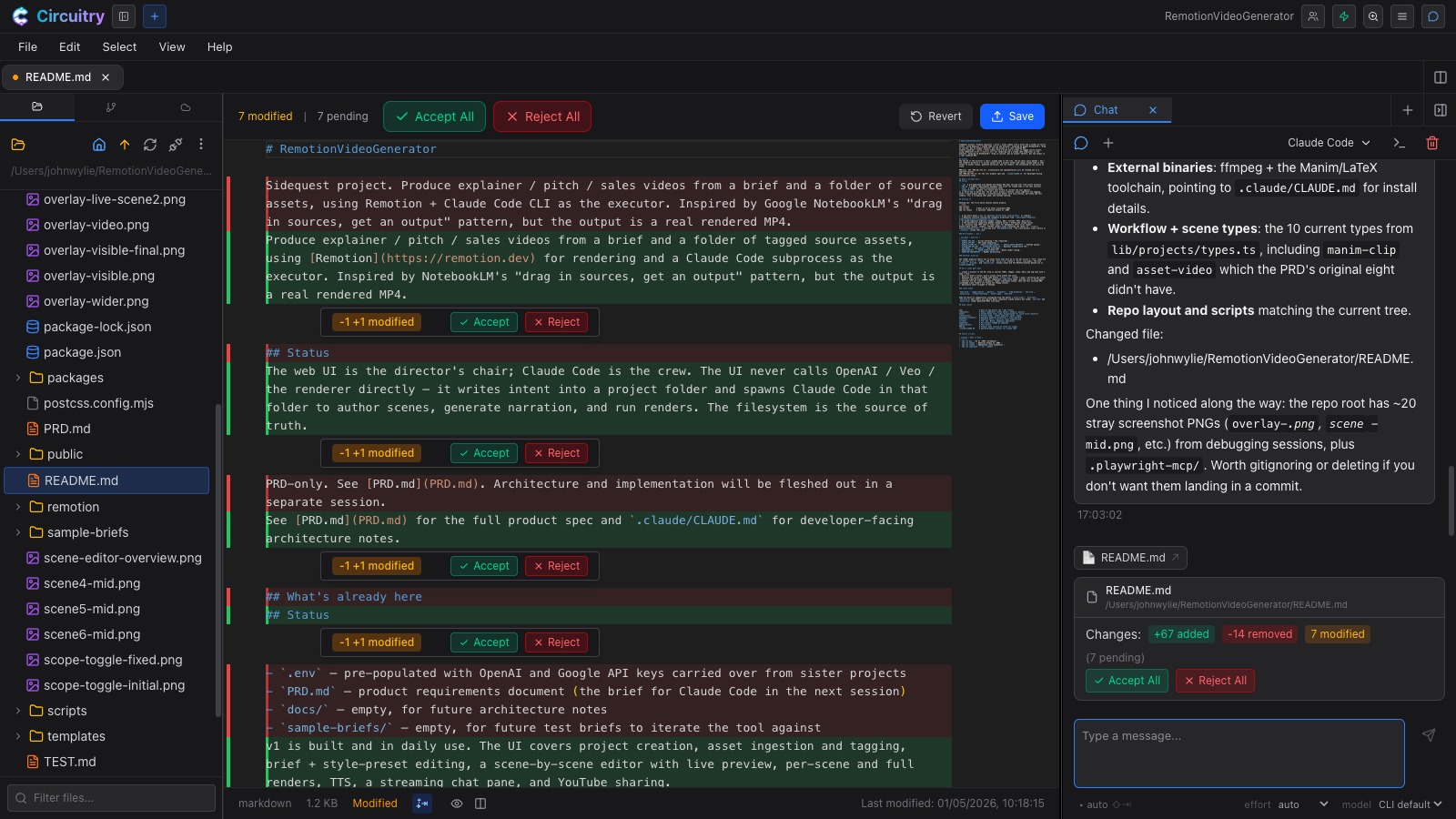
Code edits arrive as accept-or-reject hunks.

  • Each change lands in the editor as a hunk with its own Accept and Reject.
  • A review bar counts what is still pending, with Accept All and Reject All.
  • An inline edit you asked for over a selection is staged the same way.
  • A command-line assistant editing a file you have open lands there too, instead of overwriting it underneath you.
Agent edits arrive as hunks — Accept or Reject each, with the bar counting what is still pending.

Agent edits arrive as hunks — Accept or Reject each, with the bar counting what is still pending.

Ghost text ahead of the cursor, and a prompt on the line you are on.

Inline AI

  • Ghost text drafts what comes next — Tab takes all of it, Cmd+→ (Ctrl+→ on Windows and Linux) takes one word, Esc dismisses it.
  • Cmd+K opens a prompt at the cursor: describe the change and it is written there.
  • With code selected, that result is staged as a diff rather than applied.
  • Both run on whichever model you choose — your default, whatever the chat is using, or one pinned to this alone.

Ghost text stays off until you switch it on. It is the one AI feature here that fires without being asked for.

Shot needed
Ghost text completing a function in faint type, and the Cmd+K prompt box open on the cursor line.

A .tsx file opens with the component running beside it.

Live split preview

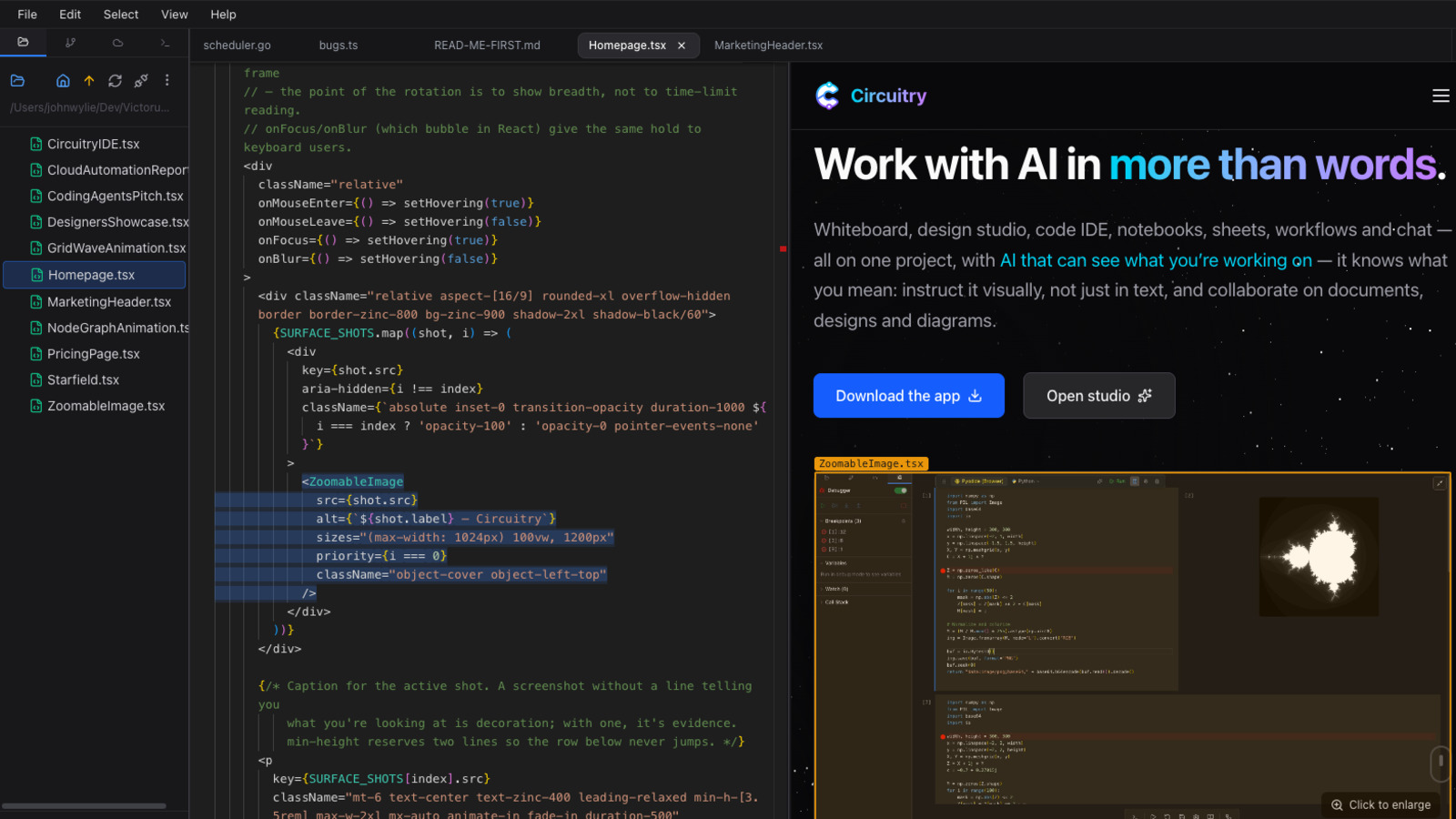
The preview is built from the buffers you have open and the project’s own modules, so it moves as you type. Hover a line and the element lights up in the render; hover the render and the code selects, then click to land on that exact element. Markdown and HTML files open the same way.

A .tsx file open in the code IDE with the React component rendering live in the right half of the tab, the selected JSX block highlighted and the matching element outlined in the render

A React component, and the page it renders, in one tab.

Language servers, running on your machine.

  • TypeScript is checked as a project: it reads your tsconfig, loads your sources, and resolves imports across files.
  • Pyright, gopls, rust-analyzer and clangd install on request from the editor’s status bar — Python, Go, Rust, C and C++.
  • Hover types, completions, signature help and go-to-definition come from the server, not from a heuristic.
  • A chip in the status bar names the one that is running, and offers the one that isn’t.

A language server indexes a directory, so it needs a project folder open on a machine you have connected.

Vim keys, multiple cursors, and the transform no menu has.

  • Vim keybindings in every code editor, toggled with Cmd+Shift+V (Ctrl+Shift+V on Windows and Linux) once you have turned them on.
  • Multiple cursors: the next occurrence, every occurrence, or one cursor per selected line.
  • Rename Symbol understands scope, so it leaves the same-named variable in another function alone.
  • Filter Through Command sends the selection to a Python or shell command and replaces it with the output — and will write that command from a plain description of what you want.

The editor runs on the device in your hand. The project stays on your machine.

Circuit is a small companion app in the menu bar or system tray of your Mac, PC or Linux box. It holds the files, the terminals and the command-line assistants; an iPad, a phone or a browser attaches to it and edits them in place. Nothing is copied anywhere to make that work.

Shot needed
The code IDE on an iPad, editing a project file that lives on a desktop machine, with the Circuit connection shown.

The same editor runs inside workflow steps and notebook cells.

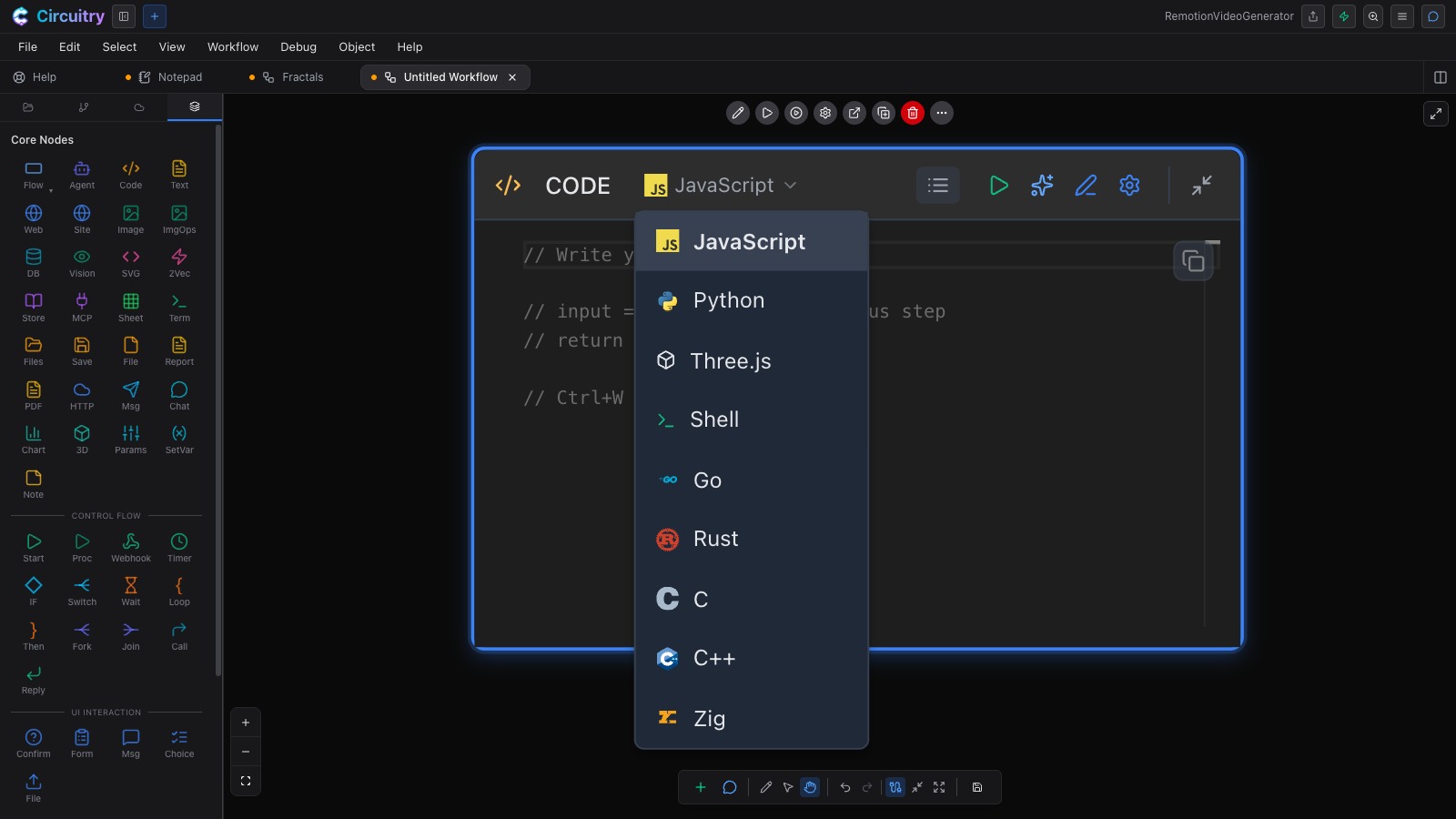
The same editor that holds your project files holds the code on a workflow step and in a notebook cell, where a step can be JavaScript, TypeScript, Python, Three.js, Shell, Go, Rust, C, C++ or Zig. The same agent reads your whiteboards, designs, workflows and terminals too — so you can point at a diagram and ask for the code that implements it.

A Code step on the workflow canvas with its language menu open: JavaScript, Python, Three.js, Shell, Go, Rust, C, C++ and Zig

The same editor, on a workflow step.

Point it at your project and start.

Free for non-commercial use. Reaching your own machine from a phone or tablet needs a paid plan.

The other surfaces in the studio