DesignerDraw it roughly. Finish it properly.

A vector design studio with shape recognition, gradients and effects, generators, type on a path, picture tracing and 200,000 icons — and the same document turns into a real web page when the design is done.

Part of Circuitry Studio — the same AI works in every surface, on the models you choose.
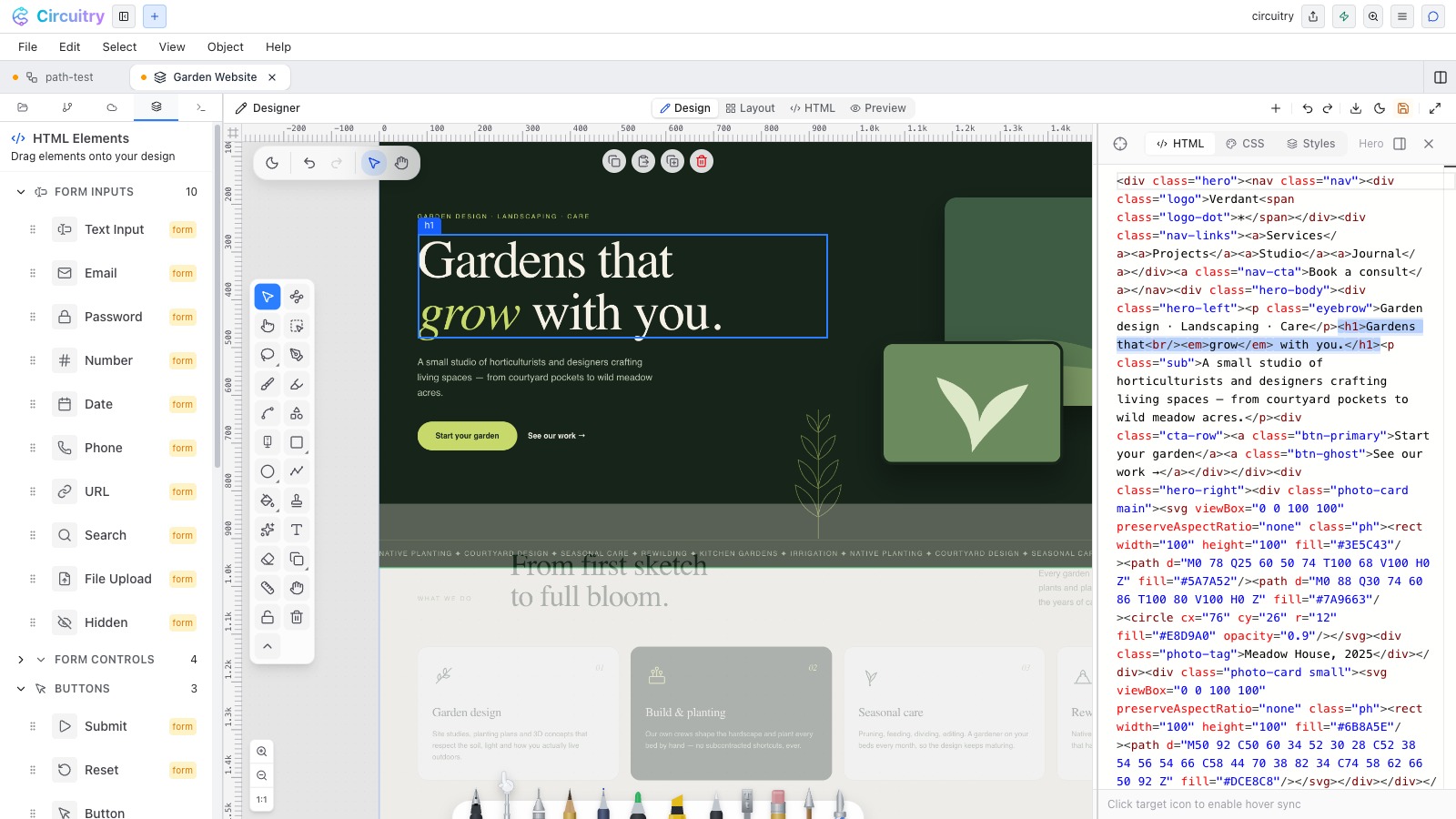
A design in progress in the designer.

Draw it rough, and a clean one takes its place.

Shape recognition

Sketch a circle, a box or a triangle freehand and a tidy shape replaces it. It is still a real object afterwards — double-click and you are editing its vertices, the same as anything drawn with the path pen. From there it takes a gradient fill, an outline and a shadow, so a rough idea reaches a finished look in a few seconds.

Video, not a still
A freehand sketch snapping to clean shapes as the pen lifts, then taking a gradient fill and a shadow.

Combine shapes into one new shape.

Boolean operations

Select two or more objects and Combine gives you Unite, Subtract Front, Subtract Back, Intersect, Exclude Overlap and Divide. Unlike grouping, these replace what you selected with one new editable shape — holes and all — which you then reshape vertex by vertex like anything else on the canvas.

Shot needed
Two overlapping shapes, with the six boolean results laid out in a row beside them and labelled.

Some shapes should be generated, not drawn.

  • Spiral draws a true spiral from a few numbers — and makes a ready-made path to run text around.
  • Gear generates gear shapes to the tooth count you set.
  • Replicator repeats a selection in a pattern, so one drawn element becomes the whole array.
Shot needed
The spiral, gear and replicator panels in the sidebar, with the artwork each one produced on the canvas.

Text that follows a path, extrudes, and becomes shapes.

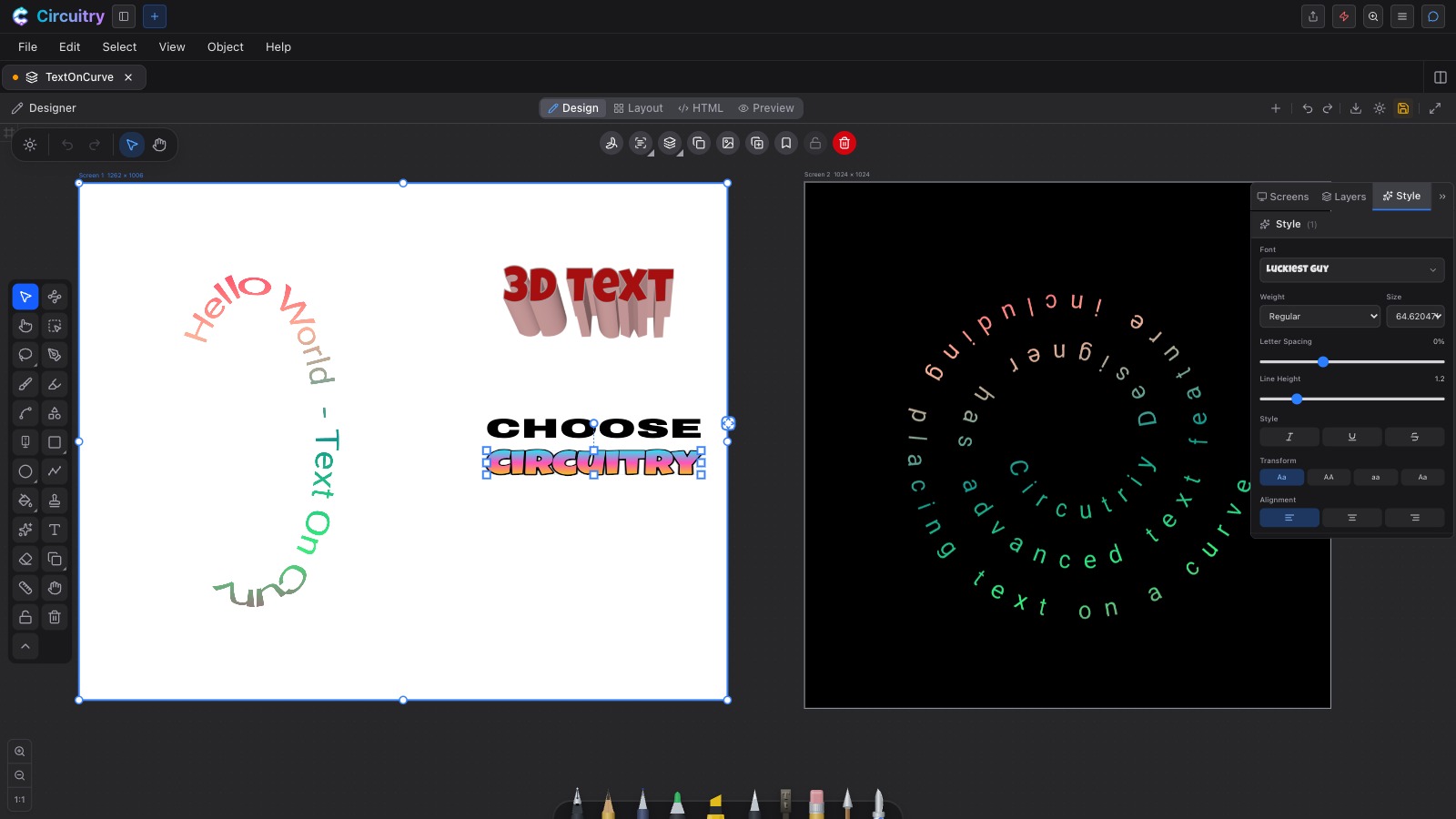
Put text on any path — a curve you drew, or a generated spiral — and it flows along it while staying editable text. Font, size, weight, alignment and spacing sit in the Style panel beside gradient lettering, shadow, glow and 3D extrusion. When you want the letterforms themselves, Convert Text to Paths turns the words into editable outlines with their counters kept as real holes.

Two artboards in the Designer: text following an S-curve, 3D extruded lettering and gradient text on one, text set around a spiral on the other, with the Style panel's typography controls open on the right

Text on a curve, 3D text and gradient lettering, with the Style panel’s type controls open.

Trace a picture into editable vectors.

Select an image and trace it into clean vector shapes you can move, recolour and reshape point by point, at any size. Remove the background first if you only want the subject — and Explode breaks a vector image or a stamped icon into its individual shapes, so you can edit someone else’s artwork like your own.

Video, not a still
Generate an image, remove the background, run 2vec — a bitmap becomes editable vector shapes you can recolour and resize. The chain is the point, not any one step.

Read the lettering out of an image.

OCR

Select an image, or something you wrote by hand, and OCR reads the printed lettering into a real text object — which you can then retype, restyle, put on a path, or convert to outlines like anything else you typed.

Shot needed
A photographed sign on the canvas beside the live text object OCR produced from it.

200,000+ icons and 1,900+ fonts, already here.

Stamp any of 200,000+ icons and clipart pieces straight onto the canvas, then explode one into shapes and edit it like your own artwork. The font picker keeps your recent faces on top and opens onto the full catalogue of 1,900+ fonts, each previewed in its own face — and you can bring your own.

Shot needed
The icon browser open in the sidebar with a search term typed and results filling the grid, and the font picker beside it.

Save the whole look, then click it onto the rest.

The Style panel and presets

  • One panel holds thickness, stroke and fill (solid or gradient), opacity, corner radius, dashes, ends, corners, arrowheads, shadow, glow, blur, backdrop blur, 3D and typography.
  • Select several objects and every change lands on all of them, as one undo step.
  • Save an object’s whole appearance as a preset; click the swatch to put it on the next selection, and on the tools you draw with next.
  • A preset only gives an object what that object can wear — hand a dashed-arrow style to a filled circle and it takes the colour, weight and effects and quietly skips the rest.
Shot needed
The Style panel with the Presets strip open below the controls, a grid of swatches each drawn as the style it holds.

Artboards side by side, each with its own layers.

A design holds as many artboards as you need, laid out on one canvas at their real sizes, each with its own background and its own layer stack to add, reorder, hide, lock and fade. Ruler-based guides snap objects into place, and positions are measured from the corner of the artboard you are working on, so the same number means the same place on every artboard.

Shot needed
Several artboards laid out side by side on the canvas, the Layers panel open on the selected one.

The same document becomes a real web page.

HTML mode

  • Four modes over one document: Design draws it, Layout marks out the rows, columns and regions, HTML decides what each region becomes — markup, an image, or SVG — and Preview renders the result, live and interactive.
  • Layout components come out as real CSS grid and flexbox.
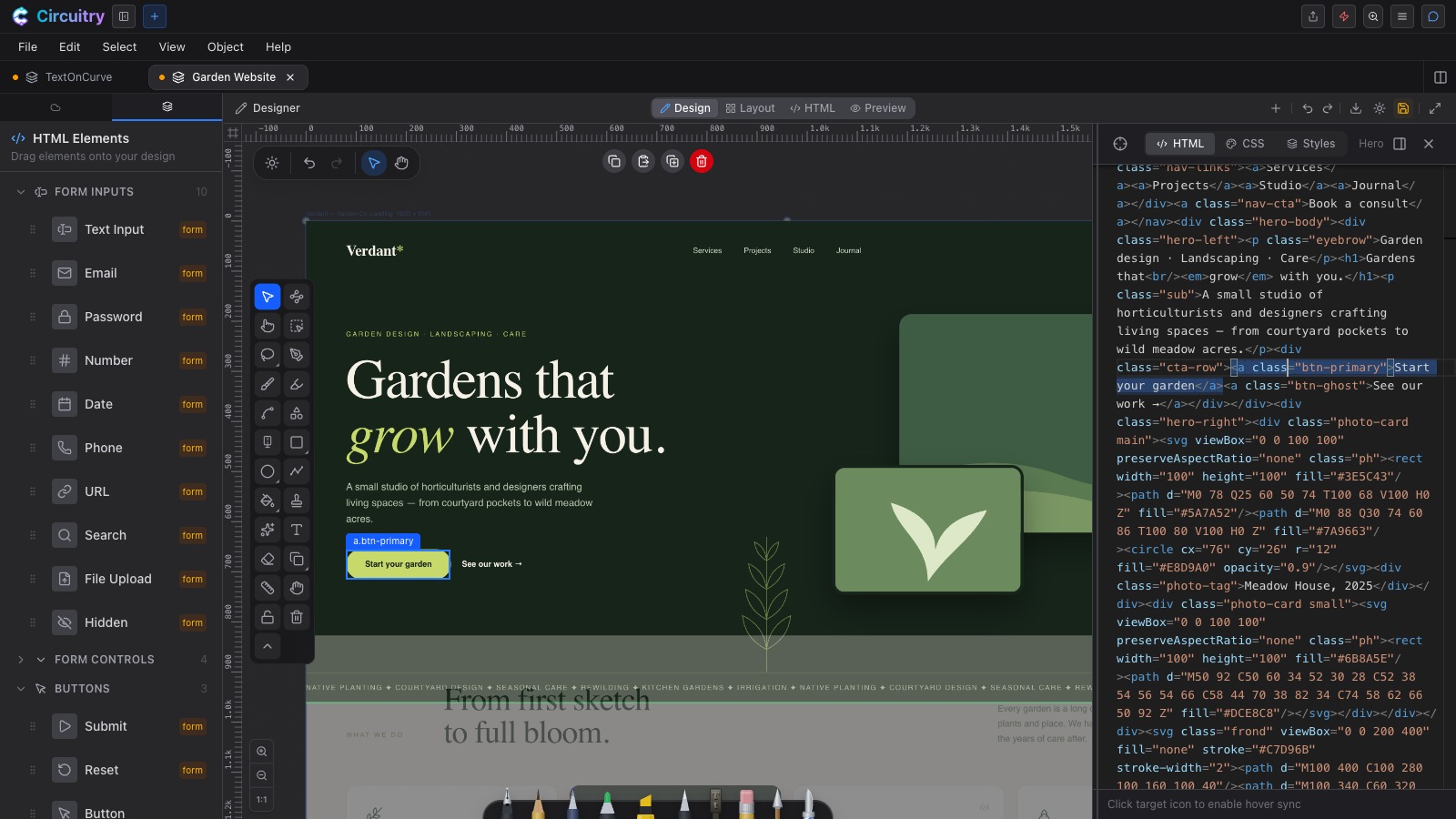
  • Double-click any HTML object on the canvas and its editor opens with that element’s source highlighted, with tabs for the markup, its CSS and its style properties — or drag a new element in from the palette.
  • It is not a one-way door: Edit Strokes brings converted content back to the vectors it came from.
A rendered web page on the Designer canvas with a button selected, its markup highlighted in the HTML panel on the right, and the drag-in element palette on the left

A button selected on the page, its markup highlighted beside it, and the element palette on the left.

Out as SVG, PNG, JPEG, WEBP or HTML.

Export the current artboard, all of them, or a hand-picked set — several at once arrive as a ZIP. SVG is true vector: shapes stay shapes, pen strokes export as their drawn outline so pressure and taper survive, gradients and shadows come across, images are embedded so the file stands alone, and text stays live text. Select a few objects and you can export just those, cropped to their own edges.

Ask the coding agent to put the logo into the app.

A design is a tab beside your project’s real files and your terminals. Draw the logo, trace it, take its background off, then select it and ask the coding agent to put it into the app — the asset lands in your project, and the conversation already knows which object you meant.

The full tour of the Designer →
Shot needed
A design open beside a project file and the agent chat, the agent wiring the drawn asset into the app.

Start with a rough sketch. Leave with the artwork.

Free for personal, non-commercial use — 10 saved cloud documents, up to 3 of them designs. Commercial work is on a paid plan.

The other surfaces in the studio