CircuitCircuit lets Circuitry use the computer you already own.

It is a small app that sits in the menu bar or system tray of your Mac, PC or Linux box. While it runs, the studio can reach that machine — its shell, its files, the Python installed on it and the graphics card inside it — whether you are sitting at it or holding a phone on the other side of the country.

Part of Circuitry Studio — the same AI works in every surface, on the models you choose.
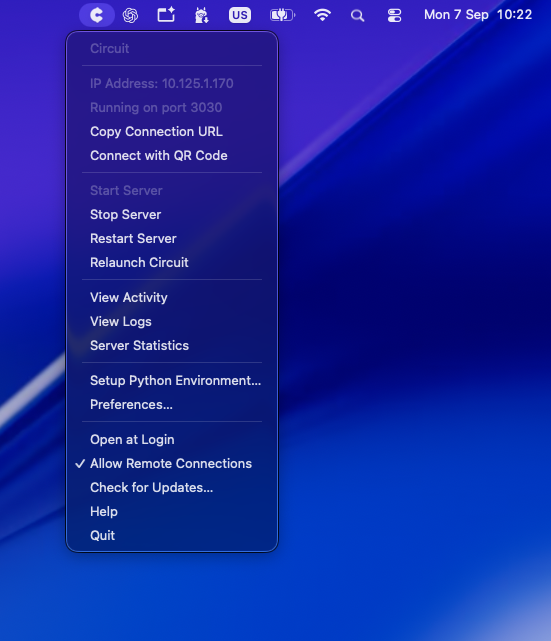
The Circuit menu open from the macOS menu bar: the machine’s address on the network, a Connect with QR Code item, and Open at Login Scan a QR code to pair
Circuit’s entire interface.

Do you need one?

Not always, and it is worth knowing which case you are in.

  • Working at one computer, in the Circuitry desktop app. You already have what Circuit provides — the app carries its own inside it.
  • Working on a phone, a tablet, a second laptop or the web. Install Circuit on the computer where your projects live, and the device in your hand drives it.
  • Adding a machine. A spare desktop, a machine with a better graphics card, the box under the stairs — install Circuit on it and Circuitry can send work to it.
  • No computer of your own to run it on. A Cloud Circuit is a Linux machine we run for you instead.

Code still runs without any of this. Python, JavaScript and TypeScript run inside Circuitry on the device you are holding, with no Circuit and no network. What a Circuit adds is the machine itself — its shell, its disk, its installed software and its speed.

A real shell, and the coding agents already on that machine.

Terminals in Circuitry run on the computer Circuit is installed on — your own shell, your own tools, your own dotfiles. The command-line coding agents you have set up there, like Claude Code, Codex or Gemini CLI, run there too, on your own subscription.

Every device attaches to the same live session. Start something at the desk, pick up the phone, and it is still the same session with the same scrollback — not a second copy of it.

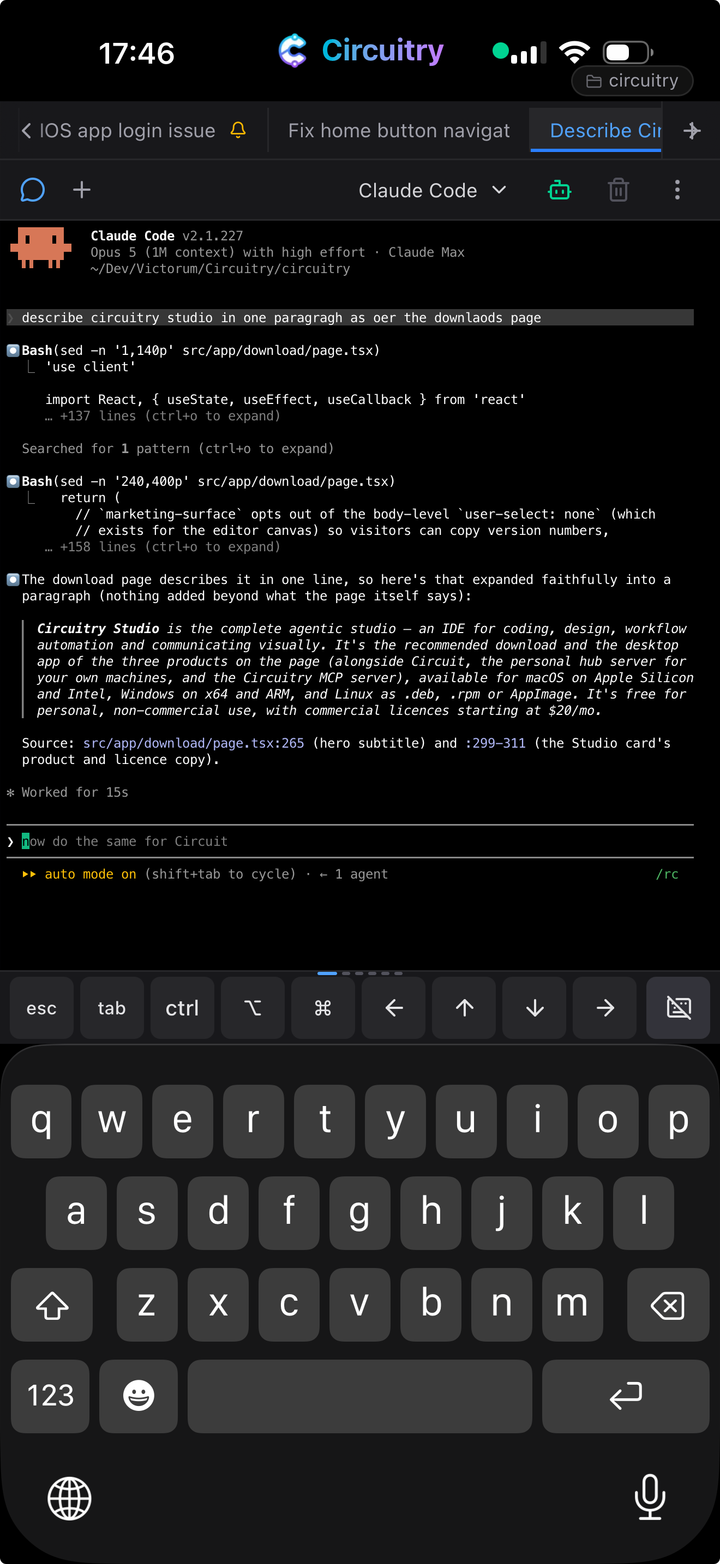
A coding agent running in a terminal on a phone, hosted on the Mac at home

A coding agent on a phone, running on the Mac at home.

Your own files, where they already are.

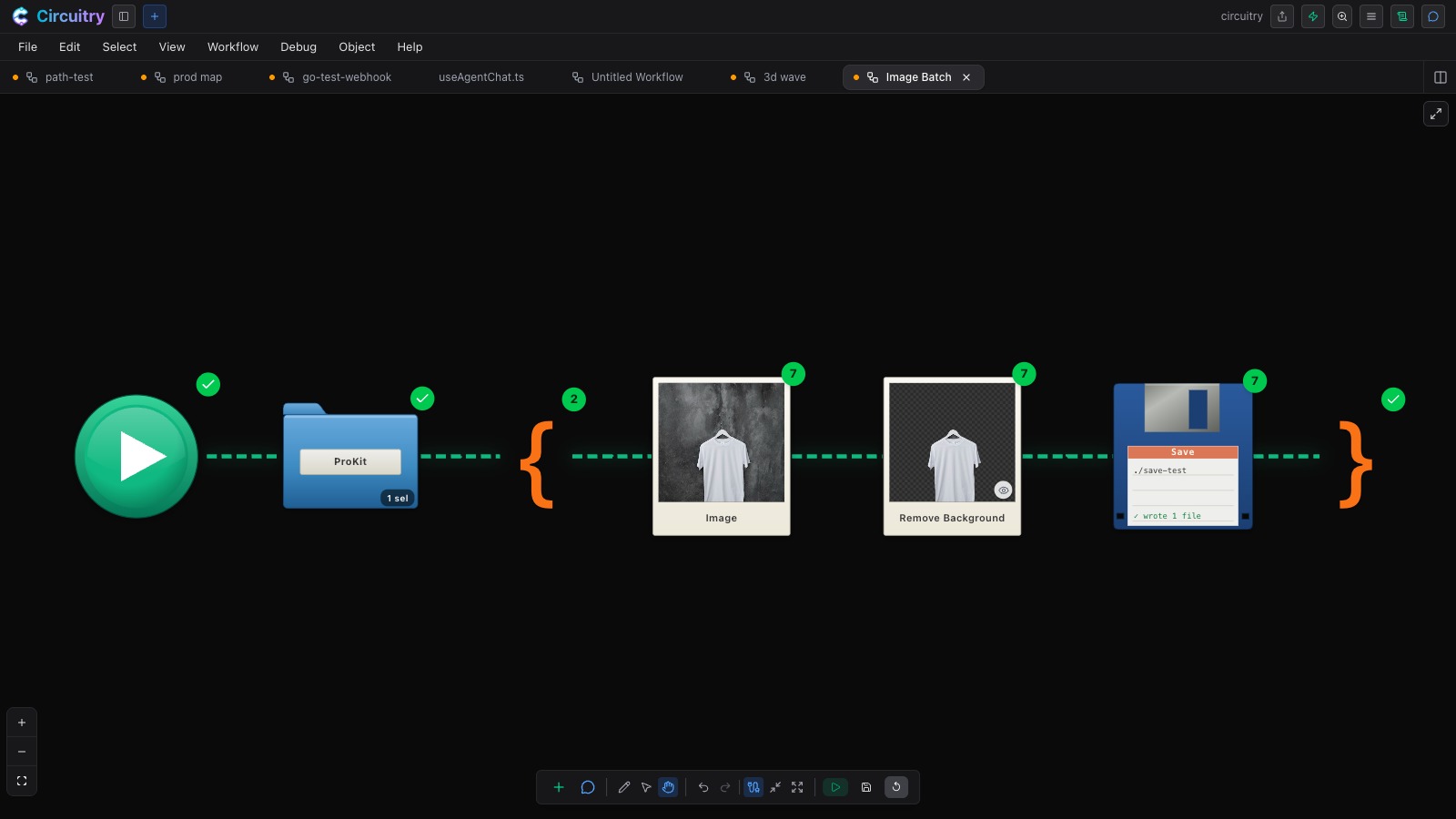
Open a project folder from that computer’s disk and work in it directly — the files are read and written in place. A workflow can walk a folder of your own photos or documents, put each one through AI, and save the results back beside the originals. Nothing is uploaded and nothing is copied to us.

A workflow reading a folder of photos, looping over each one, removing its background and saving the result

A folder on your own drive, looped through AI and written back.

The Python that is already installed there.

With a Circuit connected, a Python step can run as real Python on that computer instead of inside the page. That means the libraries you installed yourself are available, and so is the graphics card in the box — which is what makes data work and machine-learning work practical rather than theoretical.

Python still runs on the device in your hand when no Circuit is connected. This is the other one, for when you want the machine.

Somewhere for the compiled languages to compile.

Go, Rust, C, C++ and Zig need a toolchain, and a Circuit is where that toolchain lives. Your machine does the compiling; what comes out is WebAssembly, so the finished step then runs inside Circuitry on any of your devices, and in the cloud once the workflow is deployed.

The site you are building opens on your phone.

Start a preview server on that computer — the kind whose address (localhost) normally only works on that computer — and open it in a browser tab on your phone. Circuit passes it through, so what you are looking at is the real site, on the device you actually want to check it on.

More than one machine, if you have them.

Install Circuit on several computers and each one appears in Circuitry as somewhere work can go. A code step can name the machine it runs on, so a long job can sit on the fast desktop while you carry on somewhere else.

Three ways to reach a machine.

Circuit is the first of them. The other two exist because “your computer” is not always on the same wifi, and sometimes there is no computer to use.

Circuit

Connect to your Mac, PC or Linux box over your wifi.

Home Circuit

Tunnel back to your machine securely. No ports to open on your router.

Cloud Circuit

A Linux machine in the cloud, for when running Circuit at home is not possible.

What it costs.

Circuit is free to install and free to run, on as many of your own machines as you like. Work that runs on your own hardware is not metered — the only thing ever charged for on those runs is a call to an AI model we host, which comes out of your monthly credits.

Connecting a machine to Circuitry is part of Personal, $20 a month — the same plan that carries Home Circuit, Cloud Circuit and the licence for paid work. A Cloud Circuit is billed for the hours it is actually running, at a rate that depends on the size of machine you ask for.

See what each plan includes →

Setting one up.

It installs like any other app, starts with your computer, and announces itself to Circuitry on your network. Pairing a phone or tablet is a scan of the code in that window.

Put the computer you already own behind everything you make.

Free for non-commercial use. Connecting a machine of your own is on Personal and up, from $20/mo.

The surfaces a Circuit powers